A model attachment can show a product without explaining what the customer needs to decide. When feedback is scattered across files and emails, your team must reconnect each comment with the correct version. A useful 3D review brings the model, scope and next decision together.
This guide covers a customer-facing product review, not an engineering release process. In Cadloom, interactive 3D proposals combine models and supporting material with a shared version, feedback and a recorded customer response.
1. Prepare a model you are authorized to share
Choose the intended product configuration and confirm that your team has permission to process and share it. Start with a supported STEP/STP, STL, 3MF, GLB or glTF file; check the format-specific guidance rather than assuming every CAD file behaves the same way.
- Review orientation, visible parts, materials and the initial camera view.
- Check scale and dimensions against authoritative specifications.
- Remove confidential or unnecessary details from the customer-facing representation.
- Test the view on a phone as well as a desktop.
An interactive view helps explain shape and relationships. It does not certify tolerances, installation fit, safety or manufacturing readiness. Supply the relevant drawings and specifications separately when those details matter.
2. Tell the customer exactly what they are reviewing
Before adding more visuals, write one sentence defining the decision. “Confirm that this layout represents the arrangement you want us to quote” is more useful than “Please approve the model.” State what is included, what is unresolved and what happens next.
Review the overall form and visible connections of one pump design. Confirm duty requirements, dimensions, materials and availability before a formal quotation. Ask: “Which connection dimensions need confirmation for your installation?” This is a teaching example, not a customer result or a purchasable specification.
Add supporting images, video, scope tables and documents where they answer a specific question. Keep critical specifications in readable text rather than only in an image. Explore the illustrative proposal to see a model and its review context together.
4. Ask for feedback the team can act on
Invite the customer to name the part, requirement or scope item involved and explain what is unclear. A useful comment might be: “Please confirm the inlet connection dimension against our installation drawing.” Avoid asking the reviewer to infer engineering facts from appearance alone.
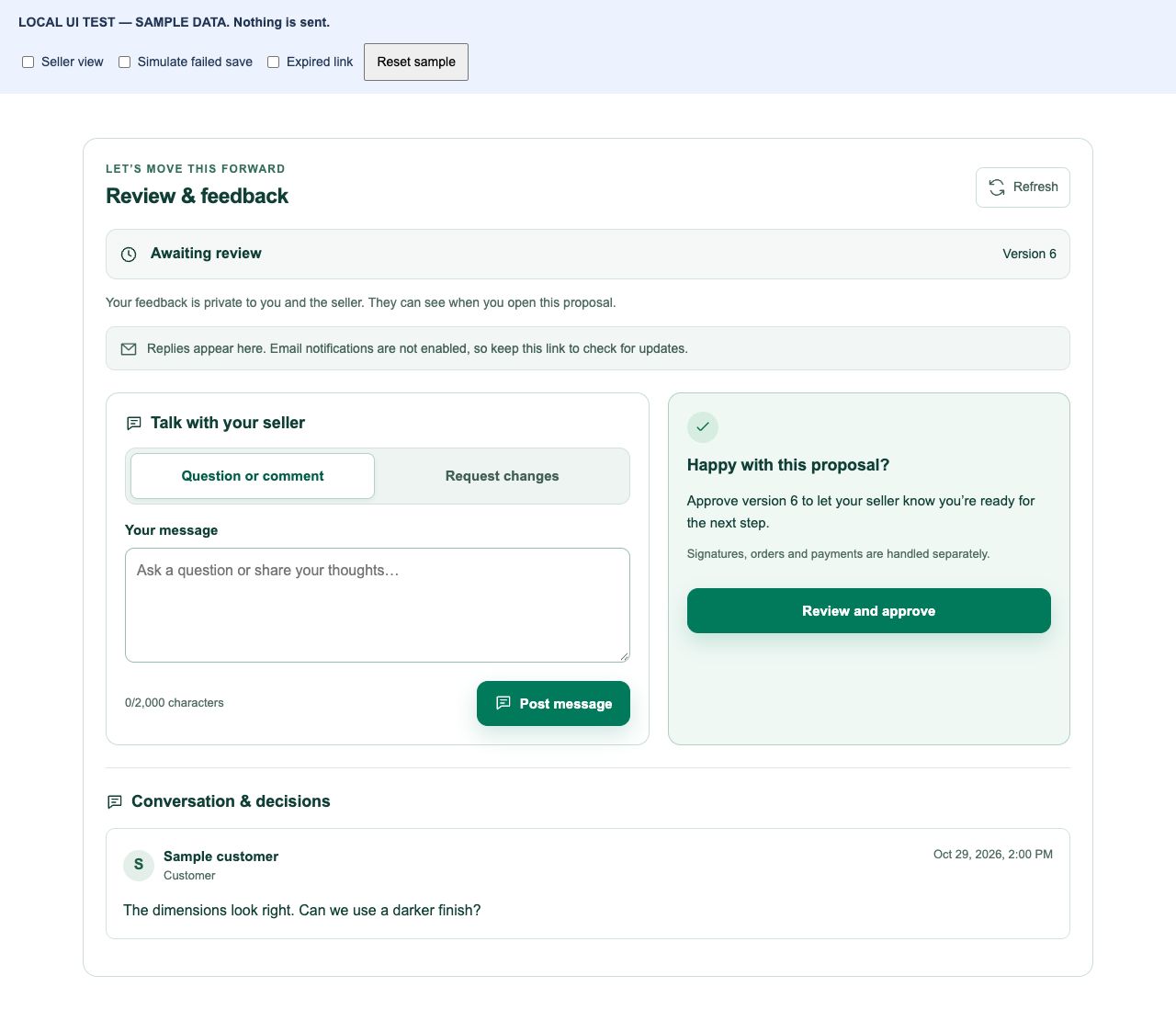
Keep clarification and the customer’s response connected to the shared version. If a requested change is ambiguous, resolve the question before revising the product presentation. Internal team coordination is a separate responsibility: assign who checks specifications, updates the draft and responds to the customer.
5. Share revisions deliberately and define approval boundaries
Update the draft after reviewing feedback, check it again, and share the revised version when ready. Explain what changed and what still needs confirmation. Do not assume that approval of an earlier version covers a new configuration.
Before requesting approval, identify the exact scope of the decision in the proposal. Cadloom records customer feedback and a response to the shared version; it does not calculate a manufacturing quotation, replace engineering validation or automatically authorize production. Keep contractual acceptance and technical release checks in your established process.
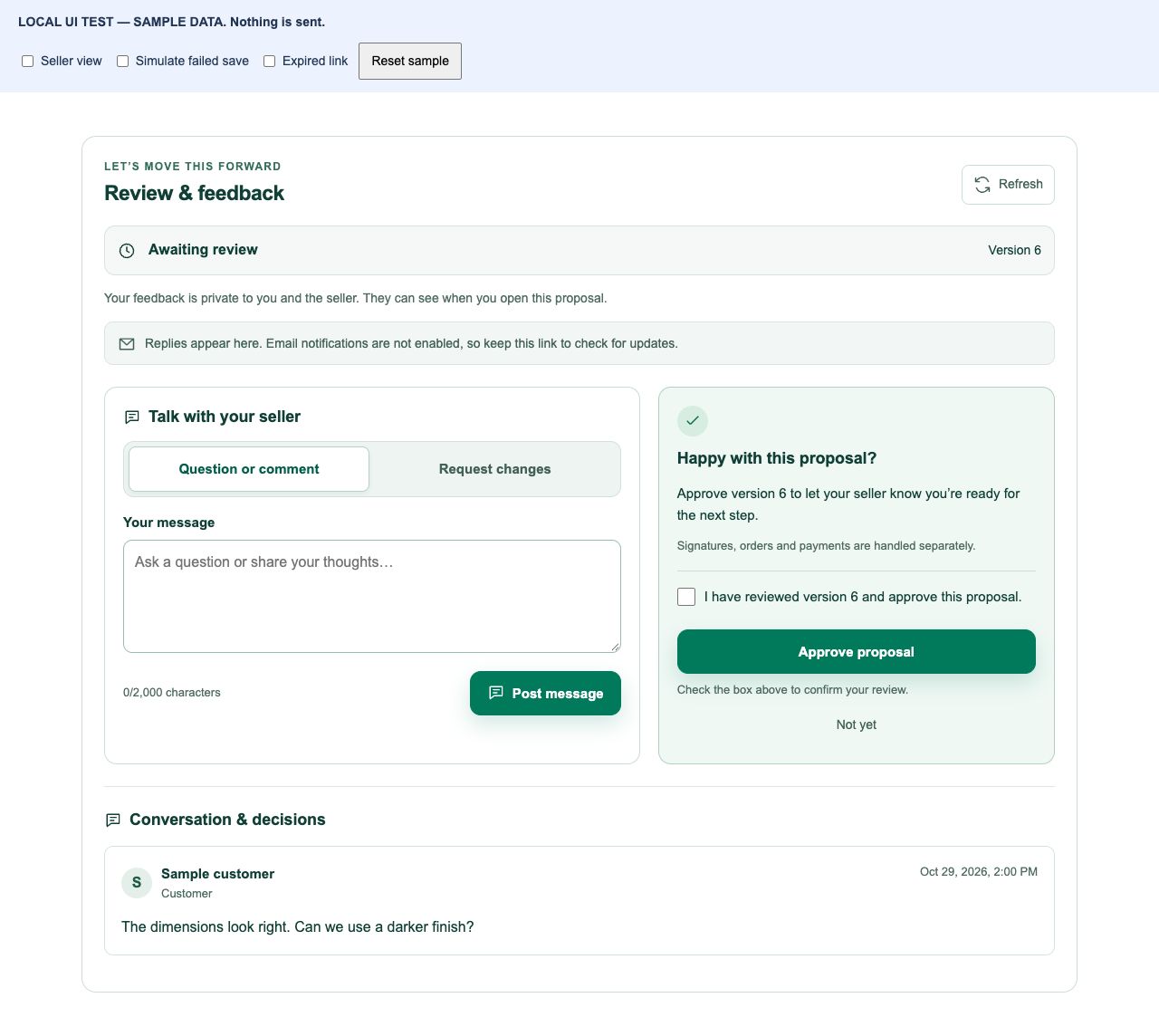
Reuse the model without mixing up evidence and creative
The same authorized model can support your website’s interactive presentation and Studio marketing images and video. Relevant assets can also help explain the proposal. Review generated visuals for accuracy before sharing; they are not proof of dimensions, finish, tolerances or fit. New Studio generation has applicable credit usage and is separate from assembling the proposal.
For manufacturers, lead with the physical questions a buyer needs answered. For fabricators, distinguish agreed visual scope from materials, dimensions, installation and pricing that remain to be confirmed. For studios and product teams, clarify which deliverables the client is reviewing and who owns later updates.
6. Measure whether the review process helps
Start with one suitable review and record preparation time, clarification rounds, time to a useful response and any rework caused by version confusion. Compare similar projects before drawing conclusions. A recorded approval is not a sale, and a shorter review does not establish revenue impact.
Assess creative-production time and cost separately, including review effort and assets that were generated but not approved. The business-value framework can help organize your own inputs without assuming savings.
- One authorized model and a checked customer view.
- A clear scope, unresolved questions and one next decision.
- The intended recipient, access settings and expiry.
- A saved version and an owner for feedback.
- Separate engineering and contractual checks where needed.
Explore 3D proposals, then prepare one customer review with an explicit scope.